Build Your First AI Agent in 30 Minutes (2026 Beginner Guide)
If you want to move beyond simple chatbots and understand how modern autonomous software systems operate, you need to build one from scratch. This guide provides a hands-on blueprint for software developers, data scientists, and technical learners entering the field of AI engineering in 2026.
We will bypass heavy enterprise abstractions and construct an operational AI Research Assistant using pure Python. By the end, you will have written the control loops, engineered the execution parameters, and deployed a foundational agent project suitable for your technical portfolio.
- Completed AI Research Assistant with modular architecture
- Programmatic Tool Calling system with JSON schemas
- Native ReAct Reasoning Loop (Thought, Action, Observation)
- Session-based Agent Memory via messages array
- Production-safe error handling and input validation
- A portfolio project you can discuss in technical interviews
1. What Is an AI Agent?
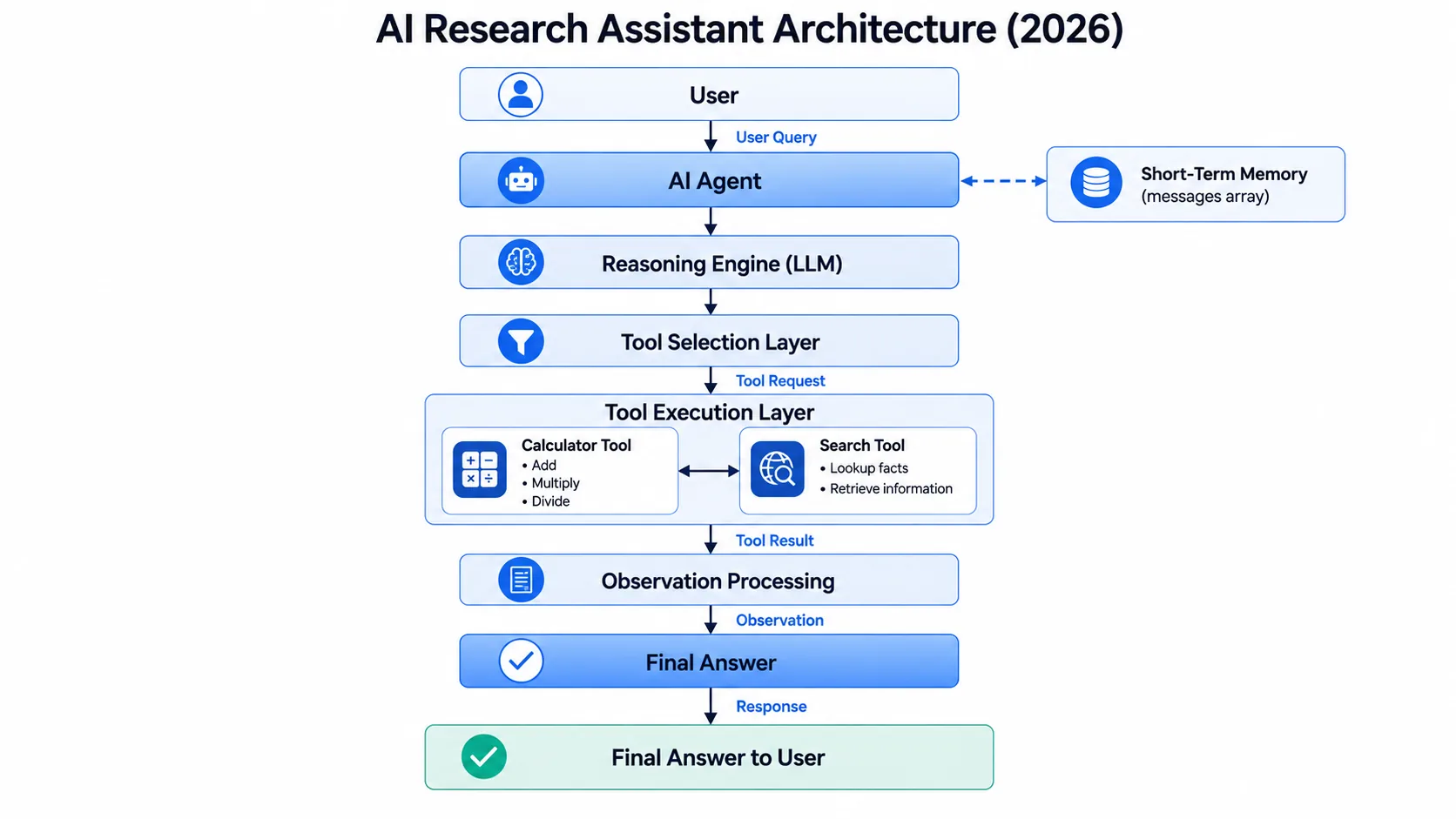
An AI Agent is a software system that uses a large language model, memory, tools, and reasoning to autonomously perform tasks on behalf of a user. Instead of merely generating text, an agent breaks down complex goals, executes external code, retrieves live data, and iterates until the objective is complete.
Why AI Agents Matter in 2026
We have transitioned from the era of static information retrieval to the era of active task execution. Businesses no longer require simple prompt-and-response interfaces. They demand digital systems that integrate with existing APIs, read and write to databases, and execute multi-step workflows. Learning how to build an AI agent equips you with the fundamental architecture required to design applied AI systems that execute real-world operational tasks.
AI Chatbots vs AI Agents
| Capability | Traditional AI Chatbot | Modern AI Agent |
|---|---|---|
| Primary Function | Text generation and conversation | Goal execution, workflow orchestration, problem-solving |
| Tool Usage | None. Locked to static training data. | Extensive. Can trigger APIs, scrape web pages, run scripts. |
| Memory | Basic session history | Structured short-term context and long-term vector retrieval |
| Actions | Passive. Waits for user input. | Active. Executes local code or remote server tasks. |
| Multi-Step Tasks | Fails. Requires user to prompt each step. | Succeeds. Capable of autonomous iterative loops. |
| Autonomy | Zero | High. Can self-correct and adjust plans based on results. |
2. Understanding Agent Architecture
Before writing Python code, you must master the cognitive architecture driving the application. In a standard chatbot, the workflow is strictly linear. In an agentic system, the LLM acts as a central reasoning engine, routing tasks to external environments, evaluating the data returned, and updating its plan dynamically.
Tool Calling
Tool Calling is an API capability where a Large Language Model pauses its standard text generation and instead outputs a structured JSON payload. This payload instructs the host application to execute a specific external function using the exact arguments generated by the model. It is the structural mechanism that gives agents their execution capabilities.
The ReAct Pattern
The ReAct Pattern (Reasoning and Acting) is a prompt engineering methodology and agent architecture. It forces the language model to explicitly generate a Thought explaining its logic, select an Action (a tool), and analyse the Observation (the tool's output) before proceeding to the next step.
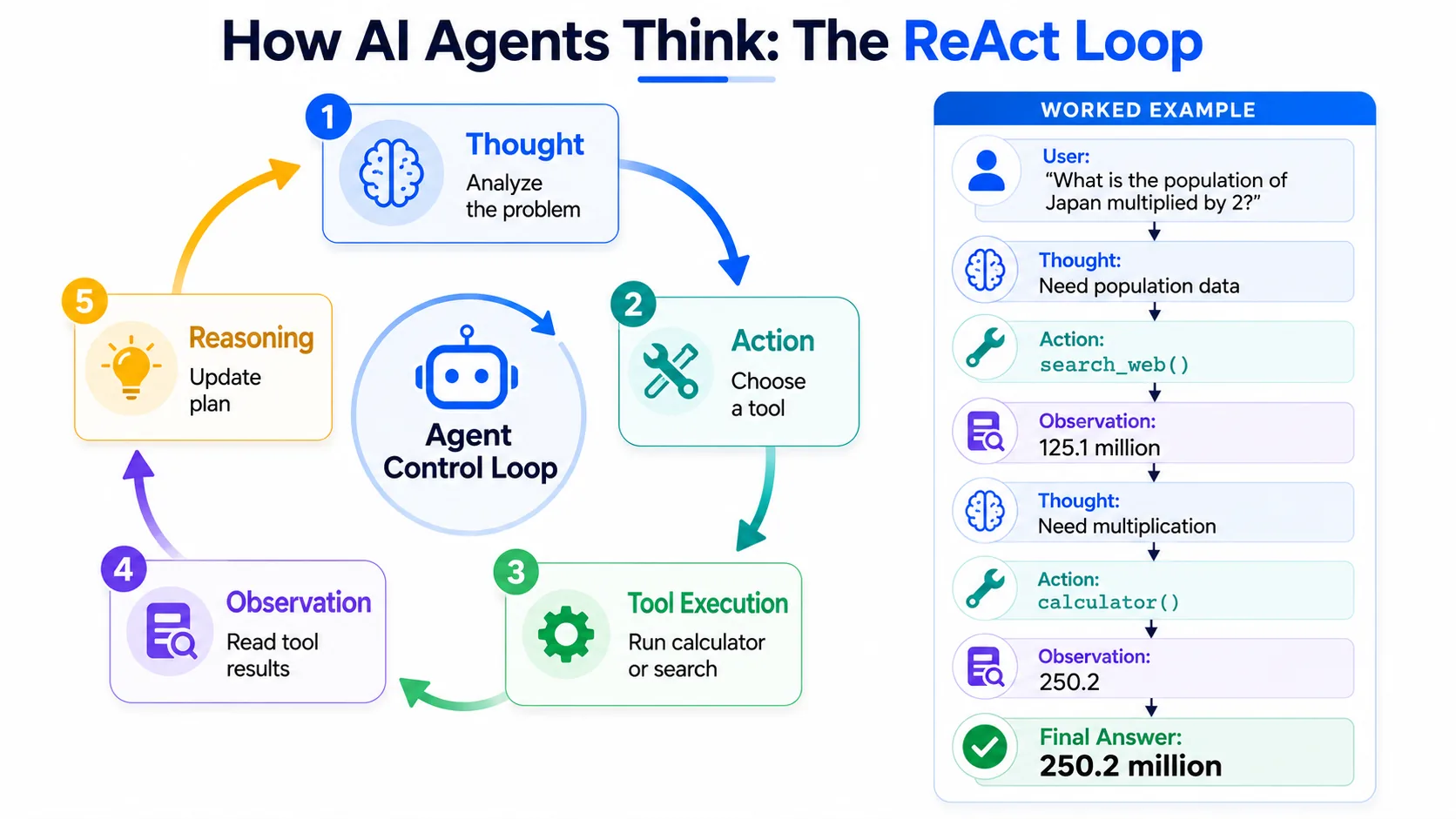
A concrete ReAct walkthrough for the query "What is the population of Japan multiplied by 2?":
Thought: I need to find the current population of Japan. I will use the search tool. Action: search_web(query="population of Japan") Observation: 125.1 million Thought: Now I need to multiply 125.1 by 2. I will use the calculator. Action: calculator(a=125.1, b=2, operation="multiply") Observation: 250.2 Thought: I have completed the calculation. I can compile the final answer. Final Answer: The population of Japan is 125.1 million. Multiplied by two, that is 250.2 million.
Agent Memory
Agent Memory is the mechanism by which an AI system retains state across interactions. Short-term memory is managed via a chronological array of messages in the current session. Long-term memory is managed via vector databases for semantic retrieval of past interactions. In this tutorial, we focus on short-term memory represented by an in-memory messages array.
3. How Much Does This Cost?
| Option | Approximate Cost | Best Used For |
|---|---|---|
| GPT-4o-mini | Under $0.30 per 100 runs | Rapid prototyping, learning, and debugging loops |
| GPT-5 / Claude Opus 4 | ~$0.02 to $0.05 per run | Complex reasoning, production applications |
| Ollama / Local Open Weights | Completely free | Local privacy, offline development, zero token costs |
Start this tutorial using gpt-4o-mini. It processes tool schemas with high accuracy while keeping costs down to pennies for hundreds of experimental execution loops.
4. Project Setup
Open your terminal and execute the following commands to initialise an isolated environment:
# Create a project directory
mkdir ai-agent-tutorial
cd ai-agent-tutorial

# Initialise a virtual environment
python -m venv venv

# Activate the environment (Mac/Linux)
source venv/bin/activate
# On Windows: venv\Scripts\activate

# Install core dependencies
pip install openai python-dotenv
Create the following file structure in your code editor:
ai-agent-tutorial/
├── main.py       # Core ReAct agent control loop
├── tools.py      # Python functions and JSON tool schemas
├── requirements.txt
└── .env          # Private environment variables (API keys)
Open your .env file and insert your API key:
OPENAI_API_KEY=sk-your-actual-api-key-hereNever commit your .env file to public version control repositories like GitHub. Add it to your .gitignore before your first commit.
Large Language Models do not understand Python function declarations directly. They read text. By providing a JSON schema, we describe our code's parameters, types, and descriptions in a structured format the LLM can parse to understand exactly when and how to use our function.
5. Step-by-Step Implementation
main.py and implement the basic setup to verify API authentication and confirm short-term memory array updates.import os
from openai import OpenAI
from dotenv import load_dotenv
# Initialise environment variables and developer client
load_dotenv()
client = OpenAI(api_key=os.getenv("OPENAI_API_KEY"))
def test_basic_connection(user_prompt: str):
# The messages list acts as our agent's short-term memory array
messages = [
{"role": "system", "content": "You are an analytical assistant."},
{"role": "user", "content": user_prompt}
]
print(f"[User Input]: {user_prompt}")
response = client.chat.completions.create(
model="gpt-4o-mini",
messages=messages
)
answer = response.choices[0].message.content
print(f"[Agent Response]: {answer}")
if __name__ == "__main__":
test_basic_connection("Confirm client communication layer operational.")Run python main.py to ensure your credentials are valid before proceeding.
tools.py. This file isolates executable Python logic from the schemas exposed to the language model.# ── EXECUTION LAYER: Python function implementations ──────────────────
def calculator(a: float, b: float, operation: str) -> float:
"""Executes basic mathematical computations with high precision."""
if operation == "add": return a + b
if operation == "subtract": return a - b
if operation == "multiply": return a * b
if operation == "divide":
if b == 0:
raise ValueError("Math Error: Division by zero is undefined.")
return a / b
raise ValueError(f"Unsupported operation: {operation}")
def search_web(query: str) -> str:
"""Simulates real-world search via a static data ledger."""
mock_database = {
"population of japan": "125.1 million residents in 2026",
"capital of france": "Paris",
"speed of light": "299,792 kilometres per second"
}
return mock_database.get(
query.lower(),
f"Search result empty for: '{query}'."
)
# Dictionary mapping for clean, decoupled execution inside our loop
tool_mapping = {
"calculator": calculator,
"search_web": search_web
}
# ── INTERFACE LAYER: JSON schema definitions ──────────────────────────
tools_schema = [
{
"type": "function",
"function": {
"name": "calculator",
"description": "Perform precise mathematical calculations.",
"parameters": {
"type": "object",
"properties": {
"a": {"type": "number", "description": "First operand"},
"b": {"type": "number", "description": "Second operand"},
"operation": {
"type": "string",
"enum": ["add", "subtract", "multiply", "divide"],
"description": "The mathematical operator"
}
},
"required": ["a", "b", "operation"]
}
}
},
{
"type": "function",
"function": {
"name": "search_web",
"description": "Search for factual statistics, current events, or verified metrics.",
"parameters": {
"type": "object",
"properties": {
"query": {"type": "string", "description": "The search query string"}
},
"required": ["query"]
}
}
}
]LLMs are prediction engines that guess the next most likely token based on language patterns. They do not perform step-by-step arithmetic logic. By offloading calculations to a native Python function, we ensure 100% mathematical accuracy.
import os
import json
from openai import OpenAI
from dotenv import load_dotenv
from tools import tools_schema, tool_mapping

load_dotenv()
client = OpenAI(api_key=os.getenv("OPENAI_API_KEY"))

def run_agent(user_prompt: str, max_iterations: int = 5):
    print(f"[User Prompt]: {user_prompt}")
    print("=" * 70)

    # 1. System prompt and short-term memory initialisation
    messages = [
        {
            "role": "system",
            "content": (
                "You are an analytical AI Research Assistant with functional tools. "
                "Use search_web for unknown facts. "
                "Use calculator for any arithmetic. "
                "Process steps using a Thought, Action, Observation cycle."
            )
        },
        {"role": "user", "content": user_prompt}
    ]

    # 2. Sequential ReAct control frame
    for step in range(max_iterations):
        print(f"\n[Iteration {step + 1}]: Evaluating current memory state...")

        response = client.chat.completions.create(
            model="gpt-4o-mini",
            messages=messages,
            tools=tools_schema
        )

        message = response.choices[0].message
        messages.append(message)  # Persist generation to conversational history

        # 3. Loop break: execution complete, no tool call needed
        if not message.tool_calls:
            print("\n[Final Answer]:")
            print(message.content)
            break

        # 4. Decoupled tool execution layer
        for tool_call in message.tool_calls:
            function_name = tool_call.function.name
            print(f"  [Tool Dispatched]: `{function_name}`")

            try:
                arguments = json.loads(tool_call.function.arguments)
                print(f"  [Arguments]: {arguments}")

                # Safety check: only allow registered tools
                if function_name not in tool_mapping:
                    raise ValueError(f"Unrecognised tool: {function_name}")

                result = tool_mapping[function_name](**arguments)
                print(f"  [Observation]: {result}")

            except Exception as e:
                result = f"Tool execution error: {str(e)}"
                print(f"  [Error]: {result}")

            # Append tool result to memory
            messages.append({
                "role": "tool",
                "tool_call_id": tool_call.id,
                "content": str(result)
            })

if __name__ == "__main__":
run_agent("What is the population of Japan multiplied by 2?")6. Running Your Agent Locally (Free, No API Costs)
You can run this exact architecture completely offline on your local hardware using Ollama. This is ideal for experimentation, privacy-sensitive data, and unlimited testing without token costs.
ollama run llama3.1main.py to point to your local Ollama server.# Divert call routing from cloud servers to your local machine
client = OpenAI(
base_url="http://localhost:11434/v1",
api_key="ollama-local-token-passthrough"
)Using open models like Llama 3.1, Qwen2.5-Coder, or Mistral allows you to scale testing and experimentation with zero usage fees or token quotas. For a more capable local model, ollama run llama3.3 is a strong upgrade.
| RAM | Recommended Model | Good for Agents? | Approx. Speed |
|---|---|---|---|
| 8 GB | Llama 3.2 3B, Qwen2.5 1.5B | Basic testing only — small models may skip or hallucinate tool calls | CPU: 5–10 t/s · M-series: 30–50 t/s |
| 16 GB | Llama 3.1 8B, Mistral 7B | Yes, reliable tool calling | CPU: 2–5 t/s · M-series: 15–30 t/s · Nvidia GPU (8 GB VRAM): 40–80 t/s |
| 32 GB+ | Llama 3.3 70B (Q4 quant) | Yes, production-quality reasoning | CPU: too slow · M-series: 8–15 t/s · Nvidia GPU (24 GB VRAM): 30–60 t/s |
| Any | GPT-4o-mini (API) | Best starting point — no local hardware needed | ~100 t/s (cloud) |
- CPU-only is painful past 7B models — 2–5 t/s means a 5-iteration agent run can take 2–3 minutes. Fine for learning, frustrating for rapid iteration.
- M-series Macs are the sweet spot for beginners — unified memory lets a 16 GB M2/M3 MacBook run Llama 3.1 8B at 15–30 t/s, responsive enough for agent loops.
- For Nvidia GPUs, VRAM matters more than RAM — a 16 GB RAM PC with a 4 GB GPU cannot hold a 7B model in VRAM and will fall back to CPU speeds.
- If in doubt, start with GPT-4o-mini — cloud inference is always fast and costs pennies during development.
7. Practical Debugging Strategies
- Symptom: The agent repeatedly calls
search_webwith identical arguments until it hits the max iteration limit. - Root Cause: The tool returned an empty or unexpected observation that failed to resolve the agent's core prompt, causing indefinite retries.
- Fix: Ensure all tools return clean, informative error strings on failure. Example:
"Search Error: Target data not found. Discontinue searching and report constraints."
- Symptom: The model attempts to execute a function but your execution layer prints an "unrecognised tool" warning.
- Root Cause: A typo exists between the identifier in
tools_schemaand the key registered intool_mapping. - Fix: Verify that the
namefield within each function entry intools_schemaexactly matches the corresponding key in yourtool_mappingdictionary.
8. Production Security Practices
Granting language models tool-execution capabilities changes your application's security model. Agents move beyond reading data to actively executing code and changing system states, which requires strict security controls.
Malicious payloads can be passed through user inputs or untrusted search results to overwrite your system prompt directives. Never pass raw user inputs directly into runtime script execution blocks.
Hardcode your function routing targets inside a locked internal mapping like tool_mapping. Never allow the model to pass string names directly to dynamic evaluation methods like eval() or exec().
If you build agents designed to write and run code on the fly, isolate their execution layer entirely inside a secure container environment like Docker or an AWS Lambda instance to protect your host system.
Wrap your external tool routes in explicit limit boundaries to protect your infrastructure against unexpected token spending spikes or infinite loop runaways.
9. Enterprise Agentic Frameworks
Once you master building the foundational control loop from scratch, you can confidently explore production frameworks designed to scale complex multi-agent architectures:
- LangGraph: Models agent states as deterministic state machines using customisable nodes and directed graph edges. Excellent for enterprise systems requiring strict human-in-the-loop approval gates.
- CrewAI: A role-driven orchestration platform that coordinates specialised multi-agent systems. Define distinct personas, equip them with isolated tools, and define collaboration pipelines.
- AutoGen: A Microsoft framework specialising in conversational multi-agent systems where multiple agent instances can collaborate, debate, and verify code execution.
- Model Context Protocol (MCP): An emerging open standard that decouples models from custom API wrapper implementations, providing a universal interface for connecting agents to enterprise data sources.
10. Portfolio Positioning
When technical interviewers review an AI portfolio project, they look beyond framework usage. They want to see that you understand the underlying foundational primitives:
- State Management Competence: Show that you understand exactly how the
messagesarray changes over time as tool observations are gathered. - Deterministic Validation Boundaries: Prove that you protect your runtime against unexpected model outputs using strict type validation and explicit error catches.
- Clean Code Separation: Demonstrate a clear architectural separation between your model interface declarations (JSON schemas) and your actual execution logic (Python functions).
- Database Interaction Agent: Connect tool parameters to a read-only SQL engine to build an interactive data analysis assistant.
- Context-Aware Support System: Connect your agent loop to a vector database like Chroma or Pinecone to build a retrieval assistant over private PDF knowledge bases.
- Automated Content Pipeline: Chain two agents together: a research agent that queries live APIs, and a writer agent that compiles the results into structured documentation.
11. AI Engineering Learning Roadmap
Building a basic single-agent loop is the entry point into a broader software engineering discipline. Use this roadmap to guide your progression toward advanced AI engineering projects.
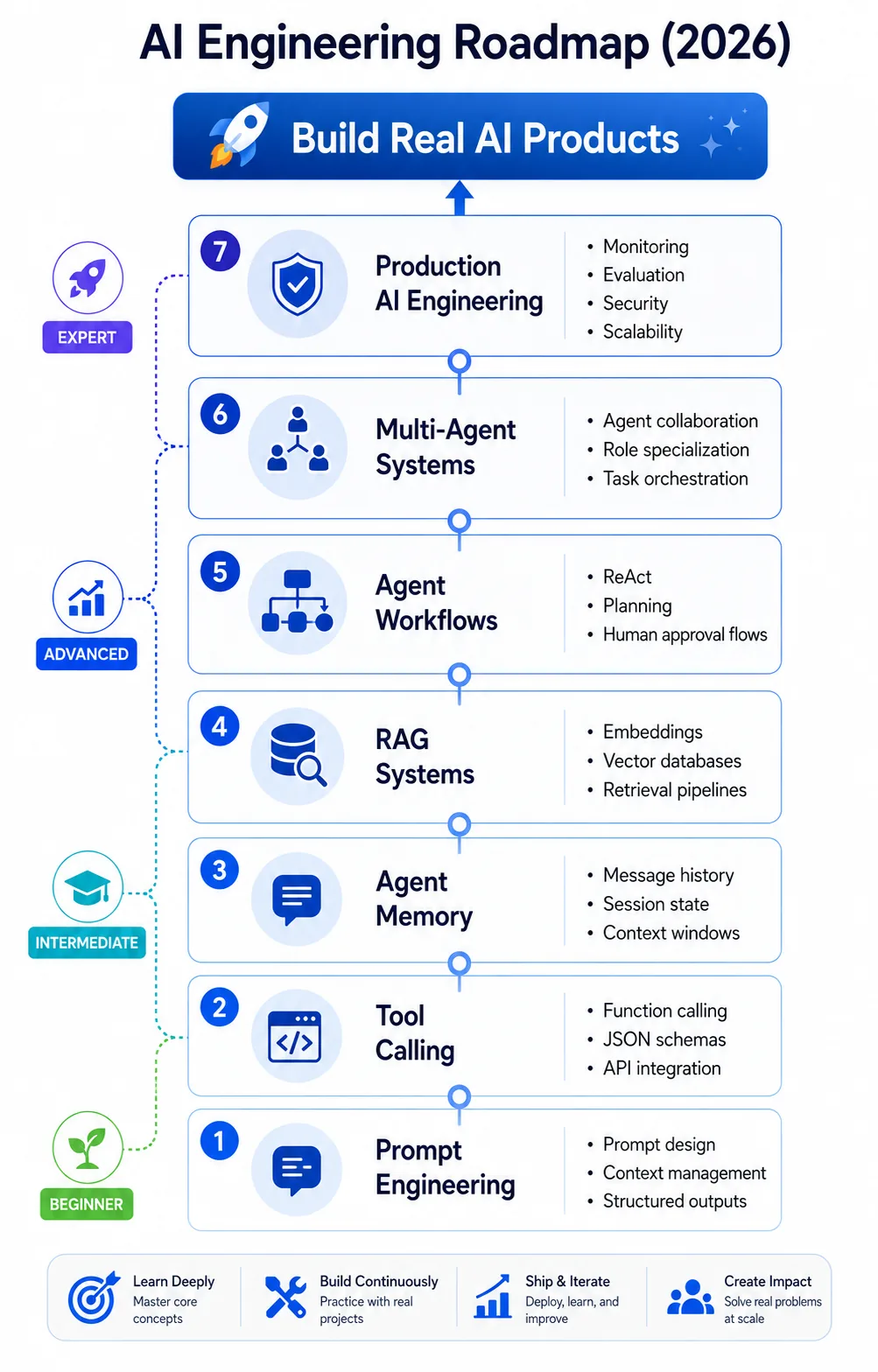
For a complete career path through all these stages, read our AI Engineer Roadmap (2026).
FAQ
No. You can construct an operational agent system using pure Python control flows and native API calling methods. Starting with raw primitives ensures you understand how the underlying system works before adopting high-level framework abstractions.
RAG is a static, linear data pipeline designed to fetch relevant document context and append it to a single prompt. An AI Agent uses an iterative reasoning loop to dynamically choose whether it needs to query a database, call an API, run a calculation, or finalise its response.
Always enforce a strict maximum iteration ceiling boundary (like the max_iterations check in our core loop) to automatically stop execution if the model gets stuck in an unresolved logic loop.
Yes. Modern models can return an array containing multiple separate tool calls in a single completion response. You can parse this array and execute the functions concurrently using Python's asyncio library to improve overall loop performance.
Short-term session memory is managed in an in-memory messages array. To support persistent long-term memory, save the historical message trail to a relational database such as PostgreSQL mapped to a unique user session ID, and reload that history whenever the session resumes.
The ReAct Pattern (Reasoning and Acting) forces the language model to explicitly generate a Thought explaining its logic, select an Action (a tool), and analyse the Observation (the tool's output) before proceeding to the next step. It is the cognitive loop that governs how the agent chains tools over time.
Tool Calling is an API capability where a Large Language Model pauses its standard text generation and instead outputs a structured JSON payload. This payload instructs the host application to execute a specific external function using the exact arguments generated by the model.
Using GPT-4o-mini, the cost is very low, under $0.30 per 100 runs, making it ideal for learning and prototyping. Using Ollama with local open-weight models is completely free with zero token costs, though it requires local hardware capable of running the model.
Agent Memory is the mechanism by which an AI system retains state across interactions. Short-term memory is managed via a chronological array of messages in the current session. Long-term memory is managed via vector databases for semantic retrieval of past interactions.
LangGraph is widely used for deterministic, high-control applications with explicit state-machine design. CrewAI is suited for role-driven multi-agent orchestration. AutoGen from Microsoft specialises in conversational multi-agent systems. The Model Context Protocol (MCP) provides a universal interface for connecting agents to enterprise data sources.
Related Role Guides
Interview Prep
Related Concepts to Study
Disclaimer: API pricing, model availability, and framework APIs change frequently. Cost estimates in this article are approximate and based on publicly available pricing at the time of writing. Always check the official provider documentation for current rates before building production systems.
Master AI/ML with AI Prep app
AI Prep covers AI Agents, Generative AI, ML Fundamentals, NLP & LLMs and a lot more, with adaptive tests and daily challenges. Fully offline on Android. Free to try, one-time unlock for lifetime access.